
pointer hand · amber in the preview
Pointer
- Drives the cursor from the index fingertip.
- Clicks, drags, right-clicks, and scrolls.
- Holds pointer poses and traces drawn strokes.
Webcam-based desktop input system using real-time hand tracking, gesture recognition, and configurable interaction modes.
A Qt desktop app for Linux that turns MediaPipe hand landmarks into a calibrated absolute pointer, clicks, drags, scrolling, and user-defined gestures. Frames are processed locally; nothing is saved or uploaded.
A webcam becomes a pointing device. Control starts paused and has to be enabled explicitly; after that, the pointer hand drives the cursor and gestures map to mouse actions, shortcuts, or commands.
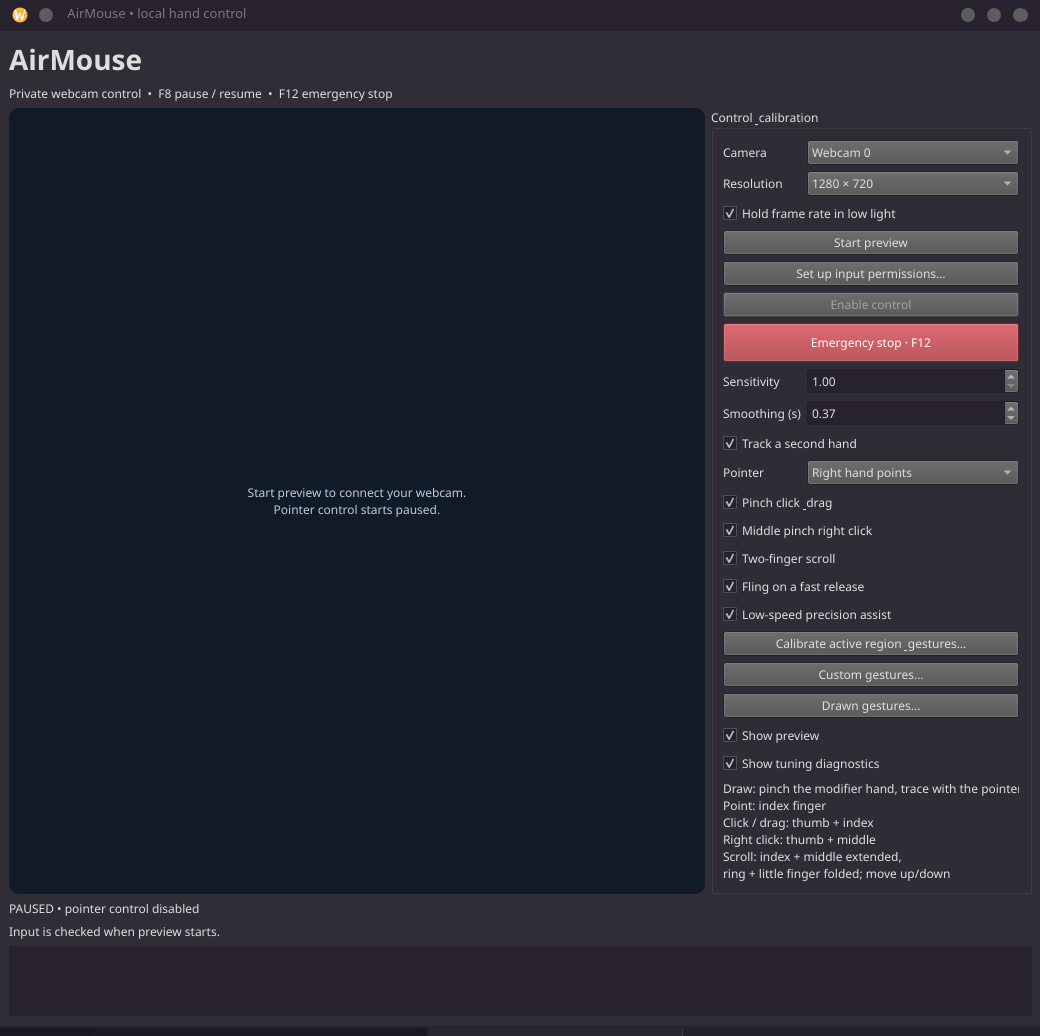
Two hands, two jobs. The pointer hand does everything a mouse does. The optional modifier hand changes what the pointer hand's gestures mean, and marks where drawn strokes begin and end.
pointer hand · amber in the preview
modifier hand · violet in the preview
The Pointer setting pins the pointer to the right or left side of the mirrored preview, recomputed every frame, so crossing your hands swaps roles predictably and uncrossing restores them. Automatic mode instead follows each hand through a crossing by matching it to where its role is predicted to be. Neither uses the model's handedness label, and a role survives a 0.4 s detection dropout.
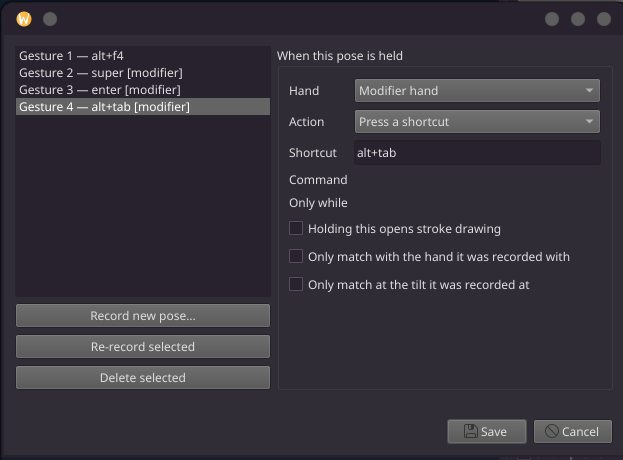
A held modifier pose is a mode. Pointer poses and strokes can be scoped to one, so a few modifier poses multiply existing gestures instead of adding new ones to memorise. Unscoped gestures keep working in every mode, a scoped gesture outranks an unscoped one of the same shape, and a chord costs two confirmation dwells in sequence.
Each recorded gesture chooses which hand it reads from, and that can be changed later without re-recording. Poses are stored relative to the wrist, scaled by palm size, rotated upright, and mirrored into one chirality, so a recording matches anywhere in frame, at any distance, with either hand. Tilt and hand locks are opt-in.
Strokes are matched with the $1 unistroke recognizer, resampled to 64 points so drawing speed drops out. Classic $1 normalises rotation away, which would make left, right, and up swipes the same line, so direction is preserved by default and orientation-free matching is opt-in per stroke. Strokes can be scoped per gate pose.
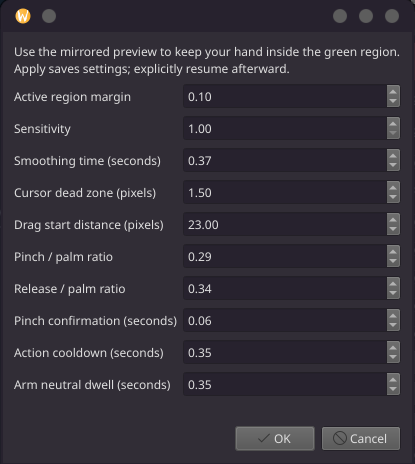
A pinch has to be confirmed before it presses. The press becomes a drag only once the hand has really moved, judged after the pinch has finished closing. An established drag lets go only when the pinch clearly opens, and a release while still moving coasts the window with the button held until the coast ends.
The active region maps absolutely onto the desktop's bounding rectangle; targets in gaps between monitors snap to the nearest visible edge. An adaptive EMA smooths pointing, a dead zone suppresses stationary jitter, and a low-speed precision clutch halves travel over a small local range when the hand settles.
Hand landmarks are noisy, the pointing finger is also the clicking finger, and the model can lose the hand at any moment. Most of the work went into decisions that keep those facts from reaching the desktop.
ProblemAn earlier velocity-dependent gain was carried as a persistent offset built up from frame-to-frame steps of a noisy landmark, which made it an integrator. On seeded 30 FPS traces it drifted while the hand was still, and four approaches to the same hand position settled up to 178 px apart.
DecisionReplaced it with a precision clutch: engaged explicitly at low speed, anchored, bounded, and computed from the current absolute position, so nothing accumulates. Disengaged, the output is identical to the plain absolute map.
Why it matteredA pointer is only learnable if the same hand position means the same screen position. Smoothing can't repair history dependence; removing the integrator can.
ProblemAt the default calibration on a 1920 px desktop, one unit of normalised hand travel is about 3000 px, so realistic landmark noise shows up as several pixels of apparent motion. A least-squares speed estimate let a single spike kick the pointer out of precision mode exactly when it was needed.
DecisionSpeed is a median of pairwise slopes over a 200 ms window, with separate entry and exit thresholds and a dwell. Non-finite detections and quarter-frame jumps are discarded, and implausible single-frame excursions are clamped rather than followed.
Why it matteredMode changes follow the hand, not the noise floor.
ProblemThe pointing landmark is the index fingertip, and closing a pinch swings it about 30 px of mapped travel while the hand stays put. One noisy frame then crossed the drag threshold, so a still click routinely became a short drag.
DecisionA press can't become a drag until the pinch has stopped closing, and movement is judged on the middle knuckle, which carries no pinch geometry. That signal is low-passed and has to clear the threshold on consecutive frames; a decisive movement skips the wait.
Why it matteredOn the project's traces, a stationary click started a drag in 6 of 30 runs rather than 30 of 30, while a deliberate drag still starts within a frame or two.
ProblemLandmarks degrade exactly when a hand is doing something: turning, hiding its own thumb, reaching the edge of the frame. Reading that as letting go drops a window mid-move.
DecisionEntering a drag needs a firm pinch; leaving one needs a clearly opened pinch. An established drag rides out short unreadable periods and estimates its anchor from the recent trajectory while the pose is uncertain. A hand lost for longer releases where it is and never throws.
Why it matteredTracking loss is never treated as an intentional release, and the lost-hand path can't reach the code that starts a fling.
ProblemMediaPipe's handedness label flickers when hands are close or overlapping, and detection order isn't stable between frames. A role swap mid-gesture would drop a drag and hand the cursor to the other hand.
DecisionRoles come from position and motion. Automatic mode matches each role to its predicted position, so crossing hands keep their roles. In use, that sticky assignment could settle the wrong way round and stay there, so side pinning, recomputed every frame, became the default.
Why it matteredRoles are predictable, and when they change it's visible in the preview instead of showing up as a jumping cursor.
ProblemEvery gesture competes with ordinary pointing. A stroke recognizer running over the cursor path would fire constantly, because here the pointer is the hand.
DecisionThe modifier hand segments strokes, using the same pinch and release hysteresis as clicking so noise can't chop one stroke into several. Poses confirm over a dwell and chords over two. The recorder refuses unsteady poses and warns when a new pose would shadow a built-in gesture or sits too close to an existing one.
Why it matteredNew gestures add capability without making normal pointing less reliable.
ProblemThe first key-bound gesture of a session froze the pointer. The virtual keyboard was created lazily on the vision thread, inside the controller lock, and evdev waits on udev for up to about two seconds, long enough for the 300 ms watchdog to correctly pull control.
DecisionThe device is now built on a background thread and primed as soon as anything is bound to a shortcut. If a key fires before it exists, the press is dropped rather than stalling tracking. Around it, a single latest-frame slot prevents backlog, stale frames skip inference, and oversized frames are downscaled before the model.
Why it matteredNothing on the frame path is allowed to wait on the desktop.
ProblemA modifier hand risked a second gesture machine trying to click with the off hand, and edits in the gesture dialog leaked straight into the live library, so an unsaved change could freeze the cursor.
DecisionMode matching lives in the controller, not in the pointer's state machine. Conflict checks are role- and mode-aware, a drawing-gate pose is a mode rather than an event, the mode held while drawing is captured when the stroke starts, and dialogs edit copies so Cancel means cancel.
Why it matteredEach interaction mode has one owner, and configuration can't change live behaviour until it's saved.
Capture, inference, and the UI each run on their own thread. Everything that decides what the desktop sees happens inside one lock in the controller, which is also what lets the emergency stop act from the keyboard thread.
capture thread
vision worker thread
controller · serialized by one lock
dispatch
qt main thread
Preview, diagnostics, and dialogs, plus a watchdog that pauses control if no frame has been processed for 300 ms.
hotkey listener
Global F8 and F12. The emergency stop takes the controller lock and releases the button without waiting for another frame.
Pointer-hand states
| Module | Responsibility |
|---|---|
| capture.py | Capture thread, MJPG negotiation, low-light frame-rate hold, latest-frame slot |
| worker.py | Vision loop: mirror, downscale, freshness gate, inference, role assignment |
| tracking.py | MediaPipe HandLandmarker in video mode with monotonic timestamps |
| roles.py | Pointer and modifier assignment from position and predicted motion |
| gestures.py | Pure feature extraction and the pointer-hand state machine |
| poses.py · strokes.py | Pose normalisation and matching; $1 stroke recognition |
| controller.py | Locked safety gate, modes, drawing gate, drag and fling, dispatch |
| mapping.py | Absolute map, adaptive EMA, precision clutch, drag estimator |
| input.py · actions.py | X11 and Wayland adapters, global hotkeys, binding dispatch |
| ui.py · recorder.py | Qt window, watchdog, gesture recorder and library |
| telemetry.py · perf.py | Diagnostics readout and optional latency profiling |
AirMouse is tested as an input device, in closed loop, not as a visual demo. The modules that make decisions have no Qt or desktop-input dependencies, so they run without a camera, and tests drive a recording backend so the real pointer never moves.
Early tests fed clean, evenly timed, noise-free frames, which is how a history-dependent pointer got past them. The trace fixtures now carry what a real 30 FPS stream has: uneven frame timing, per-frame landmark noise, and occasional single-frame excursions. Every trace is seeded, so a failure reproduces exactly.
The earlier pointer is kept verbatim as a reference implementation, so changes are measured against known-good behaviour rather than against expectations written after the fact.
What the tests pin down
test_pointer.py
test_click.py
test_drag_tracking.py
test_fling.py
test_roles.py · test_modes.py
test_strokes.py · test_poses.py
test_behavior.py · test_precision.py
test_pipeline.py · test_actions.py
test_permissions.py
The repository's validation record separates what has been verified on real hardware from what hasn't. Interactive feel, other Wayland compositors, and Windows or macOS still need hands-on testing.
Code, setup instructions, design notes, and the validation record are in the repository. Linux-first: the Windows and macOS input adapters exist but aren't validated targets.