Archived Media infrastructure · Backend · Self-hosted

HLS Streaming Server

Self-hosted HLS/IPTV server that turns a local media library into scheduled, always-on channels, with M3U playlists and XMLTV program guides for clients such as Jellyfin.

A TypeScript service backed by PostgreSQL and FFmpeg. Channels are programmed with time-based schedule blocks, encoded on demand when someone is watching, and presented to clients as if they had been broadcasting the whole time.

Earlier work · forked from n1ceh4t/hls-streaming-server

Program guide

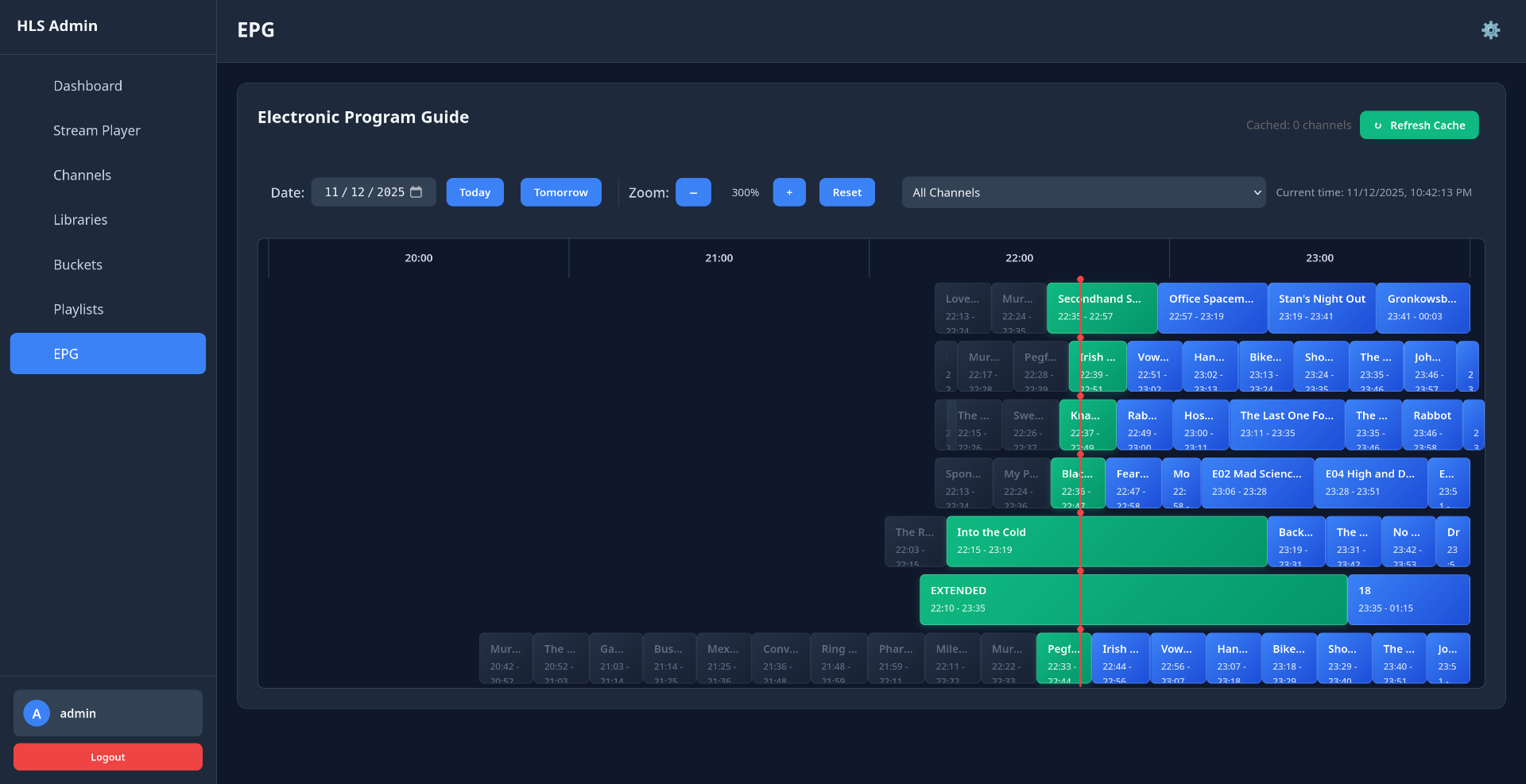
Admin program guide: a timeline grid of seven channels from 20:00 to 23:00, with the program playing now on each channel highlighted at a red current-time marker
The admin program guide for seven channels. Green blocks are playing now; everything to the right is projected from each channel's schedule, and the same data is published to clients as XMLTV. open full size
Status
Archived; last updated Dec 2025
Runtime
Node.js · TypeScript · Express
Storage
PostgreSQL · versioned SQL migrations
Delivery
HLS (fMP4) · M3U · XMLTV

What it does

A folder of video files becomes a lineup of TV-style channels. Each channel has a schedule, a guide, and a stream URL that any HLS-capable player or IPTV client can tune to.

Channels
Each channel is a continuous HLS stream with its own slug, resolution, bitrate, frame rate, and optional watermark.
Libraries
Media folders are scanned on demand or on a schedule. Episode metadata is parsed from filenames: SxxExx, 1x01, dates, absolute numbers, and more.
Buckets
Named collections of media, global or channel-specific, that channels and schedule blocks draw from.
Schedules
Blocks bind a bucket to a time range and days of the week, with sequential, shuffle, or random playback and a priority for overlaps.
Progression
Sequential blocks built on a single series pick up where they left off: one day ends at S1E3, the next starts at S1E4.
IPTV output
An M3U playlist and an XMLTV guide, so clients like Jellyfin Live TV can present the channels with a program guide.
Control
A web admin panel, a REST API described in OpenAPI, and an MCP server that exposes the API as tools for AI assistants.
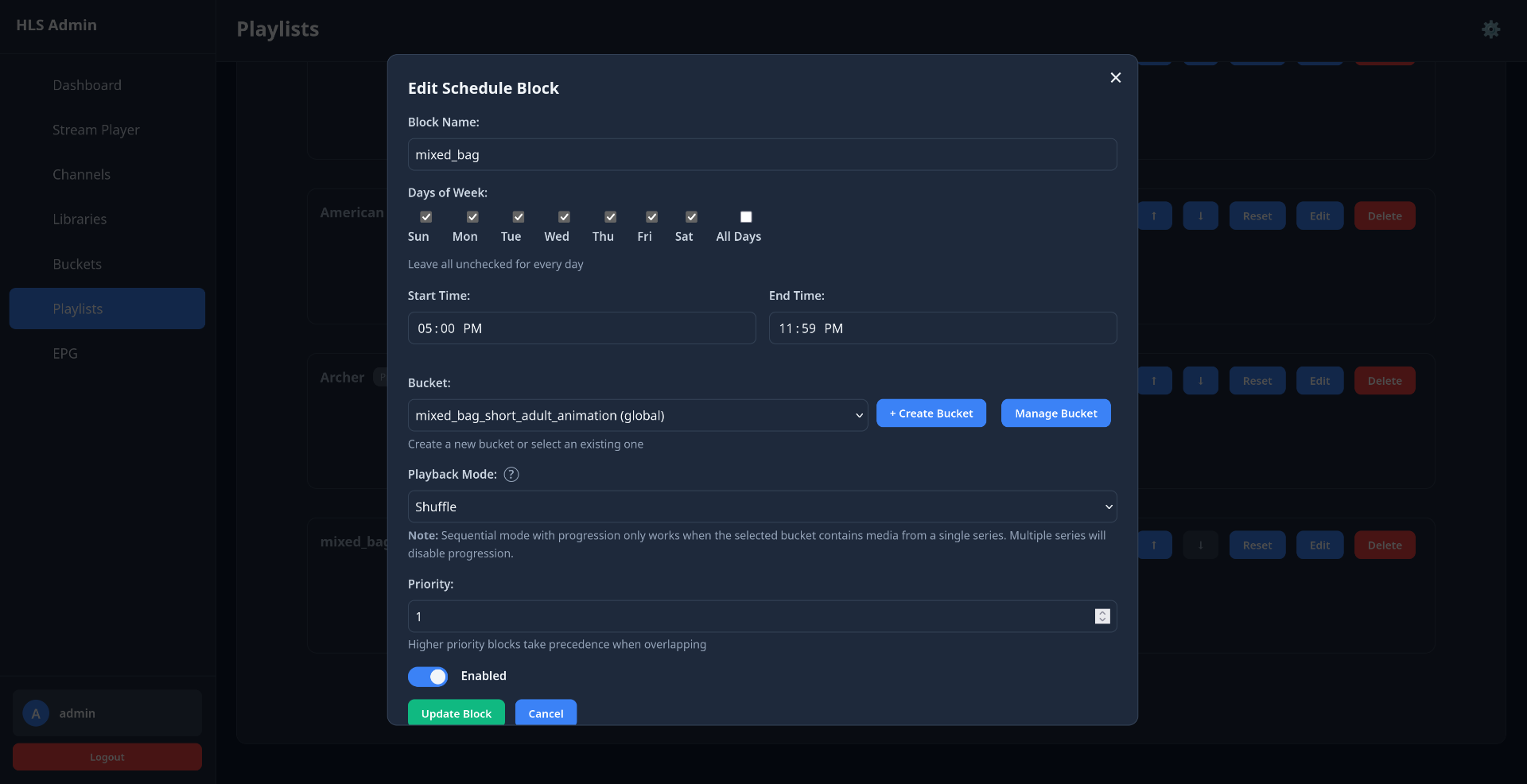
Edit Schedule Block dialog: block name, days of week, start and end time, bucket, playback mode set to Shuffle, and priority
Schedule block: days, time range, bucket, playback mode, priority
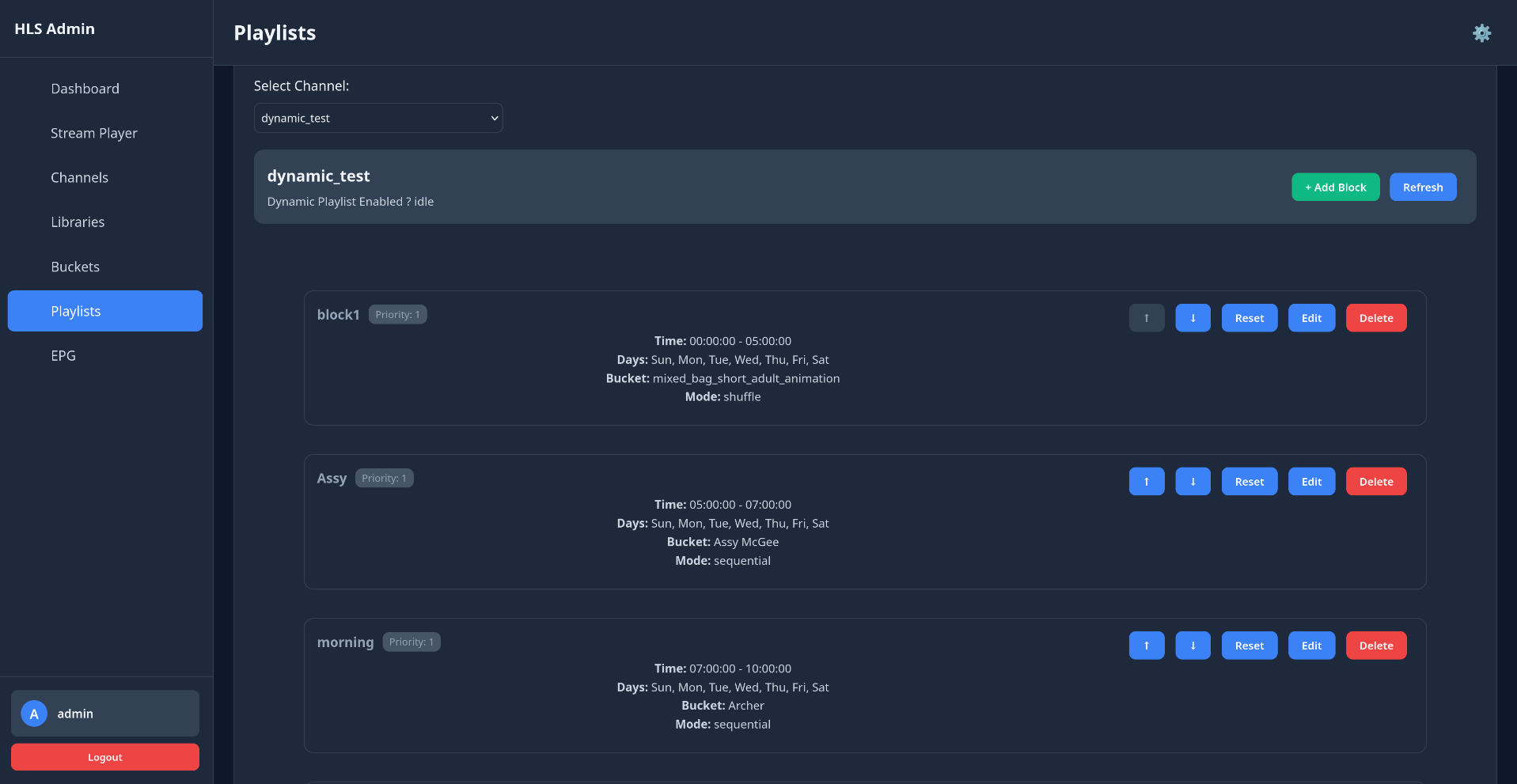
Playlists view for a channel with three schedule blocks, each listing its time range, days, bucket, and playback mode
A channel's day, built from schedule blocks

How a channel plays

A channel behaves like broadcast TV: tune in at any time and you join the schedule mid-program. Underneath, nothing is encoded unless someone is watching.

A timeline that's computed

Each channel stores one timestamp: when its schedule started. The current episode and offset are calculated on demand from the elapsed time, looping through the playlist with modulo arithmetic. Nothing has to tick forward while the channel is idle.

Encoding on demand

Viewers are tracked from their playlist requests, with a 60-second inactivity timeout. The first viewer resumes the channel at the position the timeline says it should be at, and the stream pauses after the last viewer leaves.

One pipeline per channel

A channel's episodes, with an “up next” bumper between each, are written to an FFmpeg concat playlist and encoded by a single looping FFmpeg process into HLS segments.

Schedule resolution

The active block is chosen by day, time, and priority, including blocks that cross midnight. Channels without a matching block fall back to all of their buckets.

Playback modes

Sequential, shuffle, or random per block. Shuffle is seeded from the date, so its order is deterministic instead of changing each time the playlist is resolved. Series progression is only enabled for single-series buckets.

Guide generation

The XMLTV guide covers 48 hours ahead by default, with an in-memory cache and a database cache that survives restarts. Playlist changes invalidate a channel's cached guide.

Engineering challenges

The hard parts were keeping three views of the same channel in agreement (the stream, the guide, and the stored state) and producing output that strict players accept.

01

A guide that matches the stream

ProblemA program guide has to say what will be playing at any point in the next two days. If the guide and the stream choose media by different rules, especially with schedule blocks and shuffle, the guide is wrong.

DecisionFor dynamic channels the guide calls the same playlist resolver the stream uses, at each point in time, and re-checks at the exact times schedule blocks change rather than on a fixed interval. Shuffle is date-seeded, so both ask for the same order and get it.

Why it matteredThere is one definition of “what plays when,” and guide entries land on real block boundaries.

02

Replacing tracked state with arithmetic

ProblemThe first timeline design stored each channel's file index and position and advanced them on a timer while it streamed. That state had to be kept in step with the stream and survive pauses and restarts, and it produced progression bugs.

DecisionReplaced it with a single anchor per channel. Position is derived from elapsed time whenever it's needed, and the periodic update loop was removed.

Why it matteredThe stream, the guide, and a freshly restarted server all compute the same position from one stored value.

03

From one FFmpeg per file to one per channel

ProblemThe original pipeline spawned an FFmpeg process for every file. Each episode boundary meant stopping one encoder and starting the next, with bumper segments spliced into the live playlist to cover the gap, and races around those transitions.

DecisionMoved to FFmpeg's concat demuxer: one looping process per channel over a playlist of episodes and bumpers. Everything is re-encoded to identical parameters, timestamps are regenerated across files, and keyframes are forced onto segment boundaries.

Why it matteredTransitions happen inside the encoder rather than between processes, and seeking into a channel works (to the nearest keyframe for some codecs).

04

Output strict players accept

ProblemSome clients reject what others tolerate. The code records Roku's strictness about timestamp continuity and compatibility work for Wine/MediaFoundation-based playback.

DecisionBumpers are re-encoded rather than stream-copied so their timestamps reset, audio is AAC-LC, frame rate is constant, and segments moved from MPEG-TS to fragmented MP4. Segment caching dropped from an hour to 30 seconds with revalidation, so a restarted channel doesn't serve stale segments.

Why it matteredChannels play in stricter clients, not just in a browser player.

05

Recovering from failure and restarts

ProblemA server restart leaves channels marked as streaming with no encoder behind them, FFmpeg can crash mid-stream, and a bumper overwritten while it's being read corrupts the stream.

DecisionChannels follow an explicit state machine, and on boot orphaned states are walked back to idle. State is auto-saved and restored, with streaming resumed only after media has been scanned. Crashed encoders are restarted, bumper writes are atomic, integrity-checked, and retried, and a per-channel mutex guards transition state.

Why it matteredRestarts and encoder failures recover on their own instead of leaving channels stuck.

06

Filesystem paths as untrusted input

ProblemLibrary paths and filenames flow into FFmpeg arguments and concat files, and filesystem errors can leak server paths through the API.

DecisionPaths are checked for traversal and constrained to allowed library roots, slugs are validated, and concat entries are escaped unquoted to avoid FFmpeg's quote-escaping bugs. Error messages are scrubbed of filesystem paths and API responses return relative paths. Admin accounts use bcrypt, with session or API-key auth, Helmet headers, and rate limiting.

Why it matteredA self-hosted service that shells out to FFmpeg shouldn't trust its own media library.

Architecture and data flow

One Node.js service owns the database, the FFmpeg processes, and every HTTP surface. Media moves left to right: scanned into PostgreSQL, resolved against the schedule, encoded, and served.

  1. ingest

    1. Library scanmanual or scheduled
    2. Show parserseries · season · episode from filenames
    3. PostgreSQLmedia · buckets · schedule blocks
  2. resolve

    1. Active blockday · time · priority · midnight wrap
    2. Playlist resolvermode · progression · seeded shuffle
    3. Schedule timeanchor → file + offset
  3. encode · one ffmpeg process per channel

    1. Concat playlistepisodes + “up next” bumpers
    2. FFmpegscale · watermark · CFR · keyframe-aligned
    3. HLS outputfMP4 segments · rolling playlist
  4. serve

    1. Stream endpointsmaster · stream · segments
    2. M3U · XMLTVchannel list · guide
    3. Admin UI · REST APIsession or API-key auth
    4. MCP serverAPI exposed as tools

viewer sessions

Playlist requests keep a per-viewer session alive for 60 seconds. The first viewer resumes a channel; when the last one leaves, it pauses.

state persistence

Channel state is auto-saved and restored on boot, and streaming resumes once media is available again.

Channel states

  • idle
  • starting
  • streaming
  • stopping
  • error
HLS Streaming Server modules and their responsibilities
ModuleResponsibility
ChannelServiceChannel lifecycle, concat and bumper preparation, recovery, transition state
FFmpegEngineFFmpeg commands: concat input, scaling, watermark overlay, fMP4 HLS output
ConcatFileManagerPer-channel concat playlists with bumpers, path escaping, start offsets
PlaylistResolverActive schedule block, playback mode, series progression, seeded shuffle
ScheduleTimeServiceTimeline anchor; file and offset derived from elapsed time
EPGServiceGuide generation, block-boundary checks, memory and database caches
PlaylistServiceServes the HLS playlist; bumper segment injection during transitions
BumperGenerator“Up next” bumper clips rendered with FFmpeg
MediaScanner · ShowParserLibrary scanning and episode metadata from filenames
StatePersistenceAuto-save and restore of channel state across restarts
MigrationRunnerTracks applied SQL migrations and runs each in a transaction
mcp-serverSeparate package exposing the REST API to MCP clients

Reliability and testing

Jest suites cover the domain model, the API surface, and FFmpeg command construction. Most streaming behaviour was worked out against real players, and the code comments record the constraints they imposed.

Channel.test.ts
  • idle → starting → streaming → stopping → idle
  • error is reachable from any state and recovers through idle
  • invalid transitions are rejected
FFmpegEngine.test.ts
  • input options, seek position, and codec settings
  • HLS output options and scaling filter
  • playlist creation versus reuse on restart
channels.test.ts
  • creating a channel requires authentication
  • slug format is validated and duplicates are refused
  • optional fields fall back to defaults
ChannelService.test.ts
  • channel creation, lookup by ID and slug
  • duplicate slugs are prevented
  • media assignment per channel
ShowParser.test.ts
  • SxxExx, 1x01, and date-based episode names
  • multi-episode files and years in show names
MediaFile.test.ts
  • video detection by extension, case-insensitive
  • display names from season and episode, zero-padded

This is earlier work and is no longer maintained. It has no CI configuration, and the tests don't exercise live streaming end to end.

Technologies

Runtime
  • TypeScript
  • Node.js 18+
  • Express
  • Zod
  • pino
Storage
  • PostgreSQL
  • SQL migrations
Media
  • FFmpeg
  • fluent-ffmpeg
  • NVENC · Quick Sync · VideoToolbox
Delivery
  • HLS (fMP4)
  • M3U
  • XMLTV
Security
  • bcrypt
  • sessions · API keys
  • Helmet
  • rate limiting
Tooling
  • Jest
  • ESLint
  • Prettier
  • Docker Compose
  • OpenAPI
  • MCP

Source and documentation

Setup guides for Docker and local installs, Jellyfin Live TV configuration, the OpenAPI spec, and the MCP server are in the repository. Originally published under my previous GitHub handle; this copy is a fork on SessionGoblin.